Reclaim for teams

Buy places for the people who drive, invite them by email, and get their mileage and receipts back as claims instead of spreadsheets you have to check. Send them to accounts, or to a manager who signs them off first. One bill, thirty days free, no card to start.

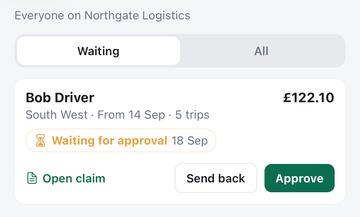
The Team claims screen: a driver's claim for £122.10 waiting for approval, with Open claim, Send back and Approve.

Buy places, not licences

A place is a person who can scan receipts and send claims. You choose how many, and you can change the number whenever the team changes.

  • An invitation holds a place from the moment you send it, so five places cannot be emailed to fifty people
  • Withdraw an invitation that has not been accepted and the place comes straight back
  • Remove someone and their access ends on their next tap, not at the end of the month
  • Hand the account to an office manager who does not drive, without spending a place on them

Their records stay theirs

You are buying your drivers a subscription. You are not buying a window onto where they have been.

  • The seat list shows who is on the account. It does not show their trips, their receipts or their claims
  • Claims reach you the ordinary way, by being sent to you
  • Someone who already pays for Reclaim keeps their own subscription underneath the place, and still has it if they leave
  • When a place ends, everything that person recorded stays in their account to view and export

Sign-off before money moves

You choose once, for the whole account, where a finished claim goes. It can reach a manager before it reaches accounts.

  • Four routes: to each driver's own address, straight to your accounts address, to a manager who approves it first, or to the dashboard with nothing emailed at all
  • Approve it, or send it back with a reason. A claim sent back reopens its trips and receipts so the driver can put them right and send again
  • Groups let a region or a depot have its own approver, so one person is not signing for everybody
  • What accounts receives is the claim that was approved, kept exactly as it was sent, not rebuilt from trips that may have changed since

Set it once, for everyone

The things that are company policy rather than driver preference are yours to fix. Anything you leave alone stays theirs to choose.

  • The mileage rate: your country's published rates, or your own flat rate per vehicle type
  • How often claims go, the date they run from and the deadline to submit, and whether the claim prints odometer readings
  • Depot and site workplaces, and job-number tags, arrive on every driver's phone spelled the same way instead of five ways
  • Whatever you set shows in the driver's app as set by you, so nobody is left wondering why they cannot change it

What a place costs

The price per person falls as you buy more, and it applies to the whole account. Fifty people is fifty at the fifty-person price, not four at full price and the rest cheaper.

Price per person by size of account
Account size Per person, monthly Per person, annually Discount
1–4 people £6.99 £59
5–9 people £5.99 £49 14% off
10–24 people £4.99 £42 29% off
25–49 people £4.49 £38 36% off
50+ people £3.99 £34 43% off

Prices are in pounds sterling and include any tax where applicable. Thirty days free, whatever size you start at, and nothing to pay to set it up.

Start a business account

How it goes

  1. Start the account. Sign in, give the business a name, and choose how many places you want. Nothing is charged to set it up.
  2. Invite people by email. They get a link, and it works whether or not they already use Reclaim. If they do, every trip they have already recorded stays exactly where it is.
  3. They drive and photograph receipts. Nothing about the app changes for them, except that there is nothing for them to pay.
  4. Claims go where you decide. Each person sends their claim for the period they work to, with the receipt images attached and the mileage already priced at your country's published rate. You set the destination once, for the whole account.
  5. A manager signs it off, if you want one to. Approve it and accounts gets exactly what was approved. Send it back with a reason and the trips and receipts reopen for the driver to fix. Both of you are told on your phone when a claim changes hands.

More than five thousand people?

Email support@reclaimexpenses.com and we will sort something out.

Questions

The guides cover how tracking, receipts and claims work day to day, and the FAQ answers the things people ask most. For anything else there is a person at support@reclaimexpenses.com.